
Compaq ProLiant ML350 Generation 2 Server Maintenance and Service Guide

Removal and Replacement Procedures
2-32 Compaq ProLiant ML350 Generation 2 Server Maintenance and Service Guide
COMPAQ CONFIDENTIAL Codename: Forge Part Number: 236634-002 Last Saved On: 5/14/02 12:00 PM
Server Feature Board
To remove the Server Feature Board:
1. Complete the preparation procedures. Refer to “Preparation Procedures” earlier in this
chapter.
2. Open the bezel door. Refer to “Bezel Door” earlier in this chapter.
3. Remove the access panel. Refer to “Access Panel” earlier in this chapter.
4. Remove the expansion board retainer. Refer to “Expansion Board” earlier in this chapter.
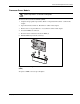
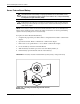
5. Push in the Server Feature Board release latch to release the board (1), then rotate the
lever outward (2).
6. Remove the Server Feature Board (3).
3
2
1
3
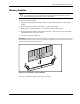
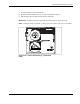
Figure 2-28: Removing the Server Feature Board
To replace the Server Feature Board, reverse steps 2 through 6.