
Compaq ProLiant ML350 Generation 2 Server Maintenance and Service Guide

Removal and Replacement Procedures
Compaq ProLiant ML350 Generation 2 Server Maintenance and Service Guide 2-29
COMPAQ CONFIDENTIAL Codename: Forge Part Number: 236634-002 Last Saved On: 5/14/02 12:00 PM
Processor
CAUTION: Electrostatic discharge (ESD) can damage electronic components. Be sure that
you are properly grounded (earthed) before beginning any installation procedure. Refer to
“Electrostatic Discharge Information” earlier in this chapter.
To remove a processor:
1. Complete the preparation procedures. Refer to “Preparation Procedures” earlier in this
chapter.
2. Open the bezel door. Refer to “Bezel Door” earlier in this chapter.
3. Remove the access panel. Refer to “Access Panel” earlier in this chapter.
4. Remove the air baffle. Refer to “Air Baffle” earlier in this chapter.
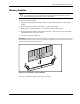
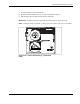
5. Release, then pull up the processor latch.
IMPORTANT: The lever must be perpendicular to the board or socket for the processor to unlock.
Figure 2-25: Releasing the processor latch