
Compaq ProLiant ML350 Generation 2 Server Maintenance and Service Guide

Removal and Replacement Procedures
2-26 Compaq ProLiant ML350 Generation 2 Server Maintenance and Service Guide
COMPAQ CONFIDENTIAL Codename: Forge Part Number: 236634-002 Last Saved On: 5/14/02 12:00 PM
Memory Module Guidelines
CAUTION: To prevent damage to equipment or loss of information, make sure that the server
is powered down, all cables are disconnected from the back of the server, and the power cord
is disconnected from the grounded (earthed) AC outlet before removing the access panel.
CAUTION: To prevent damage to the system when handling components, refer to the
Compaq ProLiant ML350 Generation 2 Server Setup and Installation Guide, Appendix B,
“Electrostatic Discharge.”
CAUTION: When handling a memory module, be careful not to touch any of the contacts.
Doing so may damage the module.
IMPORTANT: DIMMs do not need to be installed in pairs and can be installed in any sequence
The following guidelines may be helpful when memory modules are being added or replaced:
• DIMMs must be industry-standard 128-MB, 256-MB, 512-MB, or 1-GB, 168-pin PC
133-MHz or faster Registered SDRAM DIMMs. The SDRAM DIMMs must support
CAS Latency 2 or 3 (CL=2 or CL=3). They must also contain the mandatory Joint
Electronic Device Engineering Council (JEDEC) Serial Presence Detect (SPD)
information.
• Do not mix ECC and non-ECC SDRAM DIMMs. If different types of DIMMs are mixed,
the system will not properly function.
• A DIMM can be installed only one way. Be sure to match the two key slots on the
DIMM with the tabs on the DIMM socket. Push the DIMM down into the DIMM socket,
be sure that it is fully inserted and properly seated.
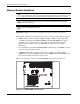
Figure 2-22 shows the locations of the SDRAM DIMM sockets on the system board.
Figure 2-22: SDRAM DIMM socket locations