
ProLiant ML330 Setup and Installation Guide



Hardware Options Installation 3-25
Compaq Confidential – Need to Know Required
Writer: Donna Hollas Project: Compaq ProLiant ML330 Setup and Installation Guide Comments:
Part Number: 173868-001 File Name: d-ch3 Hardware Options Installation.doc Last Saved On: 1/28/00 2:13 PM
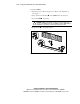
1
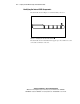
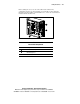
Figure 3-23. Locating the battery on the system board
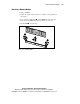
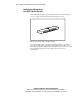
3. Slide the battery out of the holder. Lift the battery away from the
holder.
1
2
Figure 3-24. Removing the battery from the system board
4. Slide the replacement battery into the proper position with the positive
(+) side up.
IMPORTANT: Positive polarity should be positioned up.
5. Run the BIOS Setup Utility to reconfigure your system.