
ProLiant ML330 Setup and Installation Guide



3-22 Compaq ProLiant ML330 Setup and Installation Guide
Compaq Confidential – Need to Know Required
Writer: Donna Hollas Project: Compaq ProLiant ML330 Setup and Installation Guide Comments:
Part Number: 173868-001 File Name: d-ch3 Hardware Options Installation.doc Last Saved On: 1/28/00 2:13 PM
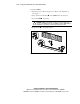
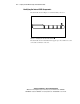
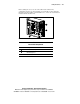
To install a DIMM:
1. Follow the steps in “Removing the Access Panel” at the beginning of
this chapter.
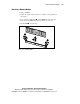
2. Press outward on both latches of the DIMM slot at the same time.
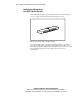
3. Insert the DIMM into the slot.
CAUTION: A DIMM can be installed one way only. Be sure to match the two
key slots on the DIMM with the tab on the DIMM slot. Push the DIMM down into
the DIMM slot, ensuring that it is fully inserted and properly seated.
4. Return latches to the upright position.
1
1
2
3
Figure 3-21. Installing a DIMM