
ProLiant ML330 Setup and Installation Guide

Hardware Options Installation 3-11
Compaq Confidential – Need to Know Required
Writer: Donna Hollas Project: Compaq ProLiant ML330 Setup and Installation Guide Comments:
Part Number: 173868-001 File Name: d-ch3 Hardware Options Installation.doc Last Saved On: 1/28/00 2:13 PM
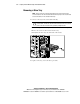
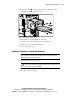
4. Remove two screws on either side of the drive to be removed, then
gently pull the drive
out of the drive bay.
2
1
1
Figure 3-10. Removing a hard drive
5. Slide the drive compartment back into the chassis.
6. Connect the power and data cables to the back of all devices.
7. Replace the access panel and the front bezel.
8. Restore power to the server.
Installing a Hard Drive in a Removable Media Bay
IMPORTANT: If you are installing a hard drive into a removable media drive bay, you
must use a drive tray. This drive tray can be found in the removable media bay. See
“Removing a Drive Tray” earlier in this chapter.
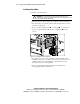
To install a hard drive using a drive tray:
CAUTION: Before removing the access panel, make sure that the server is
powered down, all cables are disconnected from the server, and the power cord
is disconnected from the grounded AC.
1. Follow the steps in “Removing the Access Panel” and “Removing a
Drive Tray” earlier this chapter.