
ProLiant ML330 Setup and Installation Guide

Hardware Options Installation 3-7
Compaq Confidential – Need to Know Required
Writer: Donna Hollas Project: Compaq ProLiant ML330 Setup and Installation Guide Comments:
Part Number: 173868-001 File Name: d-ch3 Hardware Options Installation.doc Last Saved On: 1/28/00 2:13 PM
Storage Devices
This section discusses removal and replacement procedures for the storage
devices supported on the ProLiant ML330.
Drive Positions
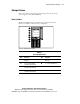
The ProLiant ML330 supports a maximum of seven internal drive bays.
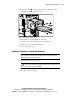
Figure 3-5 and Table 3-1 show the drive configuration.
1
2
3
4
5
6
7
Figure 3-5. Identifying drive positions
Table 3-1
Drive Bay Dimensions
Item Dimension Item Dimension
5.25 x 1.6 inch IDE CD-ROM
drive bay
3.5 x 1 inch 1.44-MB diskette
drive bay
5.25 x 1.6 inch available
removable media drive bay
3.5 x 1 inch hard drive bay
5.25 x 1.6 inch available
removable media drive bay
3.5 x 1 inch hard drive bay
5.25 x 1.6 inch available
removable media drive bay