
ProLiant ML330 Setup and Installation Guide

Hardware Options Installation 3-5
Compaq Confidential – Need to Know Required
Writer: Donna Hollas Project: Compaq ProLiant ML330 Setup and Installation Guide Comments:
Part Number: 173868-001 File Name: d-ch3 Hardware Options Installation.doc Last Saved On: 1/28/00 2:13 PM
Removing the Bezel Blanks
To remove a bezel blank from the front bezel:
CAUTION: Before removing the front bezel, make sure that the server is
powered down, all cables are disconnected from the server, and the power cord
is disconnected from the grounded AC.
1. Remove front bezel. See “Removing the Front Bezel” earlier in this
chapter.
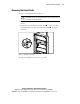
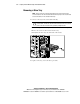
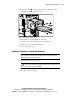
2. On the back side of the front bezel, pinch the tabs on either end of the
bezel blank toward each other, then push the bezel blank
through the
front bezel.
1
2
Figure 3-3. Removing a bezel blank
To replace a bezel blank, reverse the above procedure.