
HP ProLiant ML310 Generation 4 Server Maintenance and Service Guide

Server component identification 59
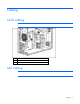
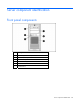
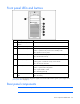
Front panel LEDs and buttons
Item Description Status
1 CD-ROM drive ejector
button
—
2 Power On/Standby button —
3 Power On/Standby LED Green = System has AC power and is functioning
Amber = System has AC power and is in standby mode
Off = System has no AC power
4 Hard drive activity LED Green = Hard drives are properly connected and functioning
Off = No hard drive activity
5 NIC link/activity LED Green = Linked to network
Flashing green = Linked with activity on the network
Off = No network connection
6 Internal system health LED* Green = Normal (system on)
Amber = System health is degraded
Red = System health is critical
Off = Normal (system off)
7 CD-ROM drive indicator
LED
On = Activity
Off = No activity
* For servers with redundant hot-plug power supplies, the internal health LED also signals a power supply event
("Rear panel LEDs" on page 61).
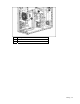
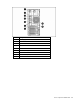
Rear panel components
NOTE: The server may look different from that shown.