
HP ProLiant ML310 Generation 4 Server Maintenance and Service Guide

Removal and replacement procedures 37
You can expand server memory by installing PC2-5300 DDR2 SDRAM DIMMs with ECC. The system
supports up to four DIMMs for a maximum of 8 GB.
IMPORTANT: DIMMs do not seat fully if turned the wrong way.
For DIMM slot locations and bank assignment, see "System board components ("System board
components" on page 62)."
Observe the following guidelines when installing additional memory:
• DIMMs installed in the server must be unbuffered PC2-5300 DDR2 DRAM, 64 bits wide, and ECC.
• If only a single DIMM is installed, it must be installed in slot 1A.
• All DIMMs installed must be the same speed.
BIOS detects the DIMM population and sets the system as follows:
• Single-channel mode: DIMMs installed in one channel only
• Dual-channel asymmetric mode: DIMMs installed in both channels but of unequal capacities per
channel
• Dual-channel interleaved mode: DIMMs installed in both channels with equal channel capacities
The following table lists some, but not all, possible configurations. For best performance, HP recommends
dual-channel interleaved mode configurations.
Channel A
Slot 1
Channel A
Slot 2
Channel B
Slot 3
Channel B
Slot 4
Total memory Mode
512 MB — — — 512 MB Single-channel
512 MB — 512 MB — 1 GB Dual-channel
interleaved
1 GB — — — 1 GB Single-channel
1 GB — 1 GB — 2 GB Dual-channel
interleaved
1 GB 1 GB 1 GB — 3 GB Dual-channel
asymmetric
1 GB 1 GB 1 GB 1 GB 4 GB Dual-channel
interleaved
1 GB 1 GB 2 GB 2 GB 6 GB Dual-channel
interleaved
2 GB 2 GB 2 GB 2 GB 8 GB Dual-channel
interleaved
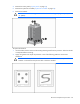
Heatsink
To remove the component:
1. Power down the server (on page 25).
2. Remove the server from the rack, if necessary ("Remove the server from the rack" on page 25).
3. Remove the bezel ("Unlock the tower bezel" on page 26).