
HP ProLiant ML310 Generation 4 Server Maintenance and Service Guide

Removal and replacement procedures 34
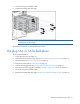
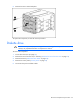
To replace the component, reverse the removal procedure.
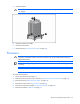
Hot-plug power supply
CAUTION: Leave all failed power supplies installed until ready to replace with a working
power supply.
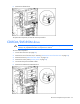
1. Disconnect the power cord of the failed power supply from the AC power source.
2. Disconnect the power cord from the failed power supply.
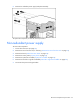
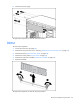
3. Remove the power supply.
To replace the component, reverse the removal procedure.
Redundant power supply backplane assembly
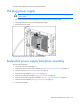
To remove the component:
1. Power down the server (on page 25).
2. Remove the server from the rack, if necessary ("Remove the server from the rack" on page 25).
3. Remove the bezel ("Unlock the tower bezel" on page 26).
4. Remove the access panel ("Access panel" on page 26).
5. Remove the system fan air baffle ("System fan air baffle" on page 26).
6. Remove the hard drive cage fan and baffle ("Hard drive cage fan and baffle" on page 28).
7. Remove all power supplies ("Hot-plug power supply" on page 34).
8. Disconnect all cables.