
HP ProLiant ML310 Generation 4 Server Maintenance and Service Guide

Removal and replacement procedures 29
6.
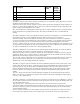
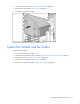
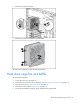
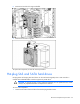
Remove the hard drive fan cage and baffle.
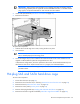
7. Remove the hard drive cage fan.
To replace the component, reverse the removal procedure.
Hot-plug SAS and SATA hard drives
Hot-plug SATA and hot-plug SAS hard drives can be used interchangeably when a SAS controller is
installed. The embedded SATA controller supports only SATA drives.
CAUTION: To prevent improper cooling and thermal damage, do not operate the server unless
all bays are populated with either a component or a blank.
To remove the component:
1. Determine the status of the hard drive from the hot-plug hard drive LEDs.