
HP ProLiant ML310 Generation 4 Server Maintenance and Service Guide

Removal and replacement procedures 28
6.
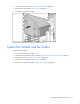
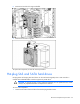
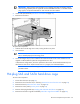
Remove the system fan module.
7. Remove the system fan module from the fan holder.
To replace the component, reverse the removal procedure.
Hard drive cage fan and baffle
To remove the component:
1. Power down the server (on page 25).
2. Remove the server from the rack, if necessary ("Remove the server from the rack" on page 25).
3. Remove the bezel ("Unlock the tower bezel" on page 26).
4. Remove the access panel ("Access panel" on page 26).
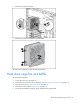
5. Disconnect the hard drive cage fan power cable from the system board.