
HP ProLiant ML310 Generation 4 Server Maintenance and Service Guide

Removal and replacement procedures 26
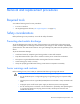
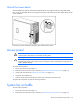
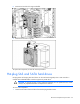
Unlock the tower bezel
The removable bezel must be unlocked and opened before accessing the hard drive cage and media
bays. It must be unlocked before removing the access panel. The bezel must remain closed during normal
server operations.
If necessary, remove the bezel by lifting the open bezel from the chassis.
Access panel
WARNING: To reduce the risk of personal injury from hot surfaces, allow the drives and the
internal system components to cool before touching them.
CAUTION: Do not operate the server for long periods with the access panel open or removed.
Operating the server in this manner results in improper airflow and improper cooling that can
lead to thermal damage.
To remove the component:
1. Power down the server (on page 25).
2. Remove the server from the rack, if necessary ("Remove the server from the rack" on page 25).
3. Unlock and open the bezel ("Unlock the tower bezel" on page 26).
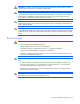
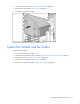
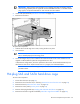
4. Loosen the two thumbscrews.
5. Slide the access panel toward the rear of the server and remove from the server.
To replace the component, reverse the removal procedure.
System fan air baffle
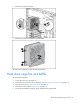
To remove the component:
1. Power down the server (on page 25).
2. Remove the server from the rack, if necessary ("Remove the server from the rack" on page 25).