
ProLiant ML310 Generation 2 Server Maintenance and Service Guide



Table Of Contents
- HP ProLiant ML310 Generation 2 Server Maintenance and Service Guide
- Notice
- Contents
- Illustrated parts catalog
- Removal and replacement procedures
- Required tools
- Safety considerations
- Preparation procedures
- Bezel
- Hot-plug SCSI hard drive
- Hot-plug SATA/SAS hard drive
- Access panel
- PCI expansion board
- Battery
- DIMM
- Air baffle
- Fan
- Power supply
- Processor assembly
- Diskette drive
- CD-ROM/DVD-ROM drive
- Installing a full-height tape drive option
- Full-height tape drive
- Power button/LED board
- Hard drive (non-hot-plug)
- Hot-plug SCSI backplane
- Hot-plug SATA or SAS backplane
- System board
- Server cabling
- Diagnostic tools
- Server component identification
- Front panel components
- Front panel LEDs and buttons
- Rear panel components
- Rear panel LEDs and buttons
- System board components
- System board LEDs
- System LEDs and internal health LED combinations
- SCSI IDs
- Hot-plug SCSI hard drive LEDs
- Hot-plug SCSI hard drive LED combinations
- Hot-plug SATA or SAS IDs
- SATA or SAS hard drive LEDs
- Fan locations
- Specifications
- Acronyms and abbreviations
- Index
Server component identification 61
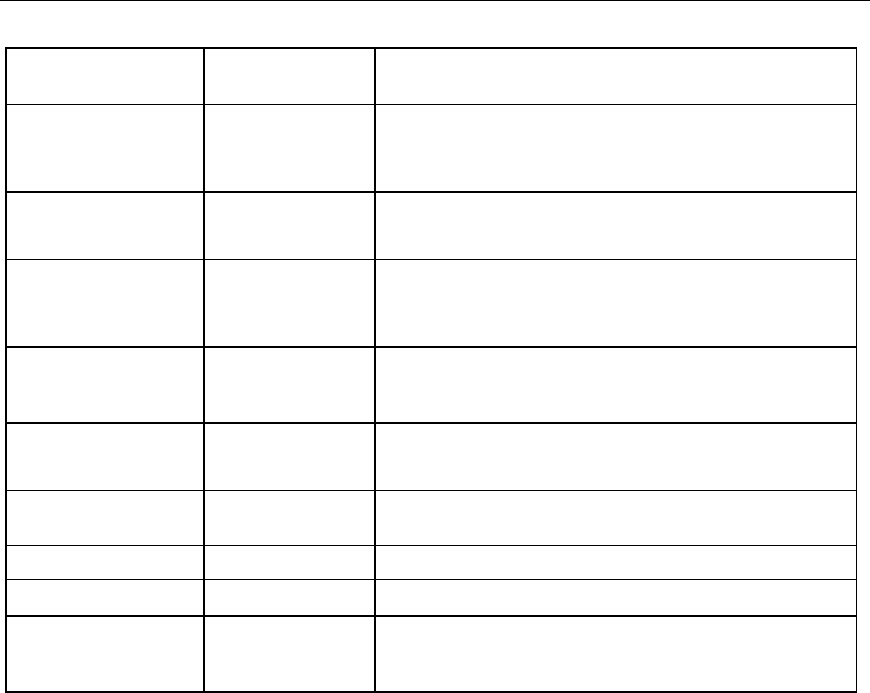
System LED and
color
Internal health
LED color
Status
PPM failure, slot X
(Amber)
Red • PPM in slot X has failed.
• PPM is not installed in slot X, but the corresponding
processor is installed.
DIMM failure, slot X
(Amber)
Red • DIMM in slot X has failed.
• DIMM has experienced a multi-bit error.
Amber • DIMM in slot X has reached single-bit correctable
error threshold.
• DIMM in slot X is in a pre-failure condition.
DIMM bank error (all
slots in one bank,
Amber)
Red The bank is not populated entirely or DIMMs do not all
match within the bank.
DIMM failure (all
slots, Amber)
Red • No valid or usable memory is installed in the system.
• The banks are not populated in the correct order.
System temperature
alert (Amber)
Red System temperature has exceeded OS cautionary level
or critical hardware level.
Fan (Amber) Red A required fan has failed.
Amber A redundant fan has failed.
Power supply
backplane failure
(Amber)
Red The power supply backplane has failed.