
ProLiant ML310 Generation 2 Server Maintenance and Service Guide


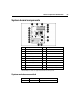
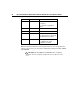
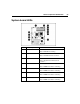

Table Of Contents
- HP ProLiant ML310 Generation 2 Server Maintenance and Service Guide
- Notice
- Contents
- Illustrated parts catalog
- Removal and replacement procedures
- Required tools
- Safety considerations
- Preparation procedures
- Bezel
- Hot-plug SCSI hard drive
- Hot-plug SATA/SAS hard drive
- Access panel
- PCI expansion board
- Battery
- DIMM
- Air baffle
- Fan
- Power supply
- Processor assembly
- Diskette drive
- CD-ROM/DVD-ROM drive
- Installing a full-height tape drive option
- Full-height tape drive
- Power button/LED board
- Hard drive (non-hot-plug)
- Hot-plug SCSI backplane
- Hot-plug SATA or SAS backplane
- System board
- Server cabling
- Diagnostic tools
- Server component identification
- Front panel components
- Front panel LEDs and buttons
- Rear panel components
- Rear panel LEDs and buttons
- System board components
- System board LEDs
- System LEDs and internal health LED combinations
- SCSI IDs
- Hot-plug SCSI hard drive LEDs
- Hot-plug SCSI hard drive LED combinations
- Hot-plug SATA or SAS IDs
- SATA or SAS hard drive LEDs
- Fan locations
- Specifications
- Acronyms and abbreviations
- Index

Server component identification 57
System board components
Item Description Item Description
1 Mouse/keyboard connectors 10 Diskette drive connector
2 Processor power connector 11 RILOE connector
3 Power supply connector 12 32-bit PCI slot
4 DIMM slot 4 (B) 13 PCI Express x4 slot *
5 DIMM slot 3 (B) 14 PCI-X slot 2
6 DIMM slot 2 (A) 15 PCI-X slot 1
7 DIMM slot 1 (A) 16 RJ-45 connector
8 IDE connector 17 USB connectors (2)
9 SATA connector 18 Serial/video/parallel ports
* x8 PCI Express cards are supported, but will run at x4 speeds.
System maintenance switch
Position Default Function
S1 Off Reserved