
ProLiant ML310 Generation 2 Server Maintenance and Service Guide


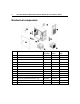
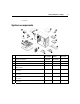


Table Of Contents
- HP ProLiant ML310 Generation 2 Server Maintenance and Service Guide
- Notice
- Contents
- Illustrated parts catalog
- Removal and replacement procedures
- Required tools
- Safety considerations
- Preparation procedures
- Bezel
- Hot-plug SCSI hard drive
- Hot-plug SATA/SAS hard drive
- Access panel
- PCI expansion board
- Battery
- DIMM
- Air baffle
- Fan
- Power supply
- Processor assembly
- Diskette drive
- CD-ROM/DVD-ROM drive
- Installing a full-height tape drive option
- Full-height tape drive
- Power button/LED board
- Hard drive (non-hot-plug)
- Hot-plug SCSI backplane
- Hot-plug SATA or SAS backplane
- System board
- Server cabling
- Diagnostic tools
- Server component identification
- Front panel components
- Front panel LEDs and buttons
- Rear panel components
- Rear panel LEDs and buttons
- System board components
- System board LEDs
- System LEDs and internal health LED combinations
- SCSI IDs
- Hot-plug SCSI hard drive LEDs
- Hot-plug SCSI hard drive LED combinations
- Hot-plug SATA or SAS IDs
- SATA or SAS hard drive LEDs
- Fan locations
- Specifications
- Acronyms and abbreviations
- Index

5
Illustrated parts catalog
In this section
Customer self repair........................................................................................................................5
Mechanical components .................................................................................................................6
System components ........................................................................................................................7
Customer self repair
What is customer self repair?
HP's customer self-repair program offers you the fastest service under either
warranty or contract. It enables HP to ship replacement parts directly to you so
that you can replace them. Using this program, you can replace parts at your own
convenience.
A convenient, easy-to-use program:
• An HP support specialist will diagnose and assess whether a replacement
part is required to address a system problem. The specialist will also
determine whether you can replace the part.
• Replacement parts are express-shipped. Most in-stock parts are shipped the
very same day you contact HP. You may be required to send the defective
part back to HP, unless otherwise instructed.
• Available for most HP products currently under warranty or contract. For
information on the warranty service, refer to the HP website
(http://h18004.www1.hp.com/products/servers/platforms/warranty/index.htm
l).
For more information about HP's customer self-repair program, contact your
local service provider. For the North American program, refer to the HP website
(http://www.hp.com/go/selfrepair
).
Customer replaceable parts are identified in the following tables.