
ProLiant ML310 Generation 2 Server Maintenance and Service Guide

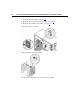
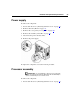
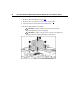

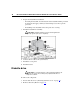
Table Of Contents
- HP ProLiant ML310 Generation 2 Server Maintenance and Service Guide
- Notice
- Contents
- Illustrated parts catalog
- Removal and replacement procedures
- Required tools
- Safety considerations
- Preparation procedures
- Bezel
- Hot-plug SCSI hard drive
- Hot-plug SATA/SAS hard drive
- Access panel
- PCI expansion board
- Battery
- DIMM
- Air baffle
- Fan
- Power supply
- Processor assembly
- Diskette drive
- CD-ROM/DVD-ROM drive
- Installing a full-height tape drive option
- Full-height tape drive
- Power button/LED board
- Hard drive (non-hot-plug)
- Hot-plug SCSI backplane
- Hot-plug SATA or SAS backplane
- System board
- Server cabling
- Diagnostic tools
- Server component identification
- Front panel components
- Front panel LEDs and buttons
- Rear panel components
- Rear panel LEDs and buttons
- System board components
- System board LEDs
- System LEDs and internal health LED combinations
- SCSI IDs
- Hot-plug SCSI hard drive LEDs
- Hot-plug SCSI hard drive LED combinations
- Hot-plug SATA or SAS IDs
- SATA or SAS hard drive LEDs
- Fan locations
- Specifications
- Acronyms and abbreviations
- Index

28 HP ProLiant ML310 Generation 2 Server Maintenance and Service Guide
2. Remove the bezel ("Bezel" on page 17).
3. Remove the access panel ("Access panel" on page 20
).
4. Disconnect the fan cable from the system board.
5. Remove the heatsink fan assembly
CAUTION: Heatsink retaining screws should be removed in
diagonally opposite pairs (in an "X" pattern).
CAUTION: The pins on the processor socket are very fragile. Any
damage to them may require replacing the system board.