
ProLiant ML310 Generation 2 Server Maintenance and Service Guide
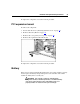
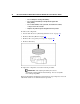


Table Of Contents
- HP ProLiant ML310 Generation 2 Server Maintenance and Service Guide
- Notice
- Contents
- Illustrated parts catalog
- Removal and replacement procedures
- Required tools
- Safety considerations
- Preparation procedures
- Bezel
- Hot-plug SCSI hard drive
- Hot-plug SATA/SAS hard drive
- Access panel
- PCI expansion board
- Battery
- DIMM
- Air baffle
- Fan
- Power supply
- Processor assembly
- Diskette drive
- CD-ROM/DVD-ROM drive
- Installing a full-height tape drive option
- Full-height tape drive
- Power button/LED board
- Hard drive (non-hot-plug)
- Hot-plug SCSI backplane
- Hot-plug SATA or SAS backplane
- System board
- Server cabling
- Diagnostic tools
- Server component identification
- Front panel components
- Front panel LEDs and buttons
- Rear panel components
- Rear panel LEDs and buttons
- System board components
- System board LEDs
- System LEDs and internal health LED combinations
- SCSI IDs
- Hot-plug SCSI hard drive LEDs
- Hot-plug SCSI hard drive LED combinations
- Hot-plug SATA or SAS IDs
- SATA or SAS hard drive LEDs
- Fan locations
- Specifications
- Acronyms and abbreviations
- Index
22 HP ProLiant ML310 Generation 2 Server Maintenance and Service Guide
• Do not attempt to recharge the battery.
• Do not expose the battery to temperatures higher than
60°C (140°F).
• Do not disassemble, crush, puncture, short external contacts,
or dispose of in fire or water.
• Replace only with the spare designated for this product.
To remove the component:
1. Power down the server ("Powering down the server" on page 15
).
2. Remove the bezel ("Bezel" on page 17
).
3. Remove the access panel ("Access panel" on page 20
).
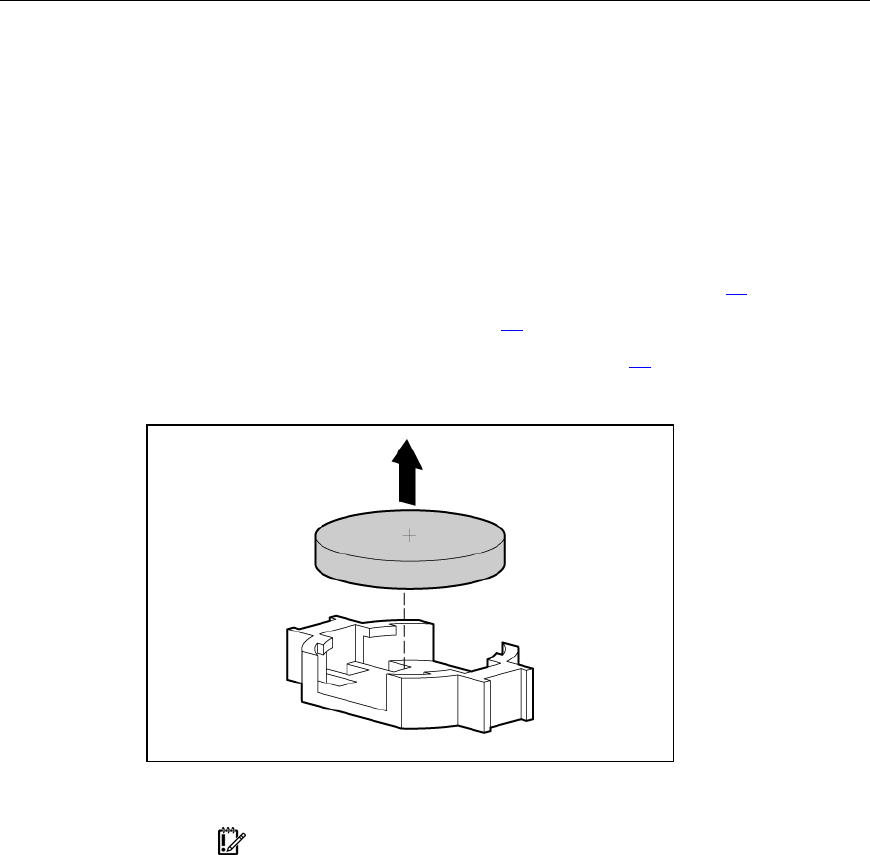
4. Remove the battery.
To replace the component, reverse the removal procedure.
IMPORTANT: After replacing the battery, the server is
automatically configured with the default settings. The user can update
these settings using RBSU.
For more information about battery replacement or proper disposal, contact an
authorized reseller or an authorized service provider.