
ZCR Option Kit Installation Sheet

HP CONFIDENTIAL Writer: Pauline Tsai Codename:Stone Soup Part Number: 355750-001 Last Saved On: 12/2/03 11:54 AM
2
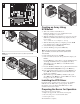
NOTE: The ZCR card must be inserted in the PCI slot 2 (green color).
3
NOTE: Be sure you save the slot cover for use later to prevent EMI
interference.
4
5
Creating an Array Using
SCSISelect
1. Turn on the monitor and the HP server.
During the startup process, pay careful attention to the
messages that display on your screen.
2. When the following message displays on your screen, press the
Ctrl-A keys simultaneously (this message displays for only a
few seconds):
Hit <CTRL+A> for Adaptec Setup
3. When the blue-background screen displays, press the Alt-R
keys simultaneously to pull down the RAID menu.
4. Select Create and press the Enter key.
5. Select the RAID type and press the Enter key.
NOTE: The ZCR card supports the RAID-0, RAID-1 and RAID-5
types. For RAID-5, the server needs to have at least three hard
drives installed.
6. In the window that appears, click OK.
7. In the next window, select the drive(s) that will comprise your
RAID 5.
Press the Enter key or Space Bar to select the highlighted drive,
and the up and down arrow keys to highlight other drives.
When finished, press the Tab key to select Done and then
press the Enter key.
8. Press the Alt-F keys simultaneously to pull down the File menu.
9. Select Set System Configuration and press the Enter key.
10. In the Configuration Changes window, press the Enter key to
select OK. The window will indicate in the Information tab
that the array is building.
11. When finished, press the Alt-F keys simultaneously again,
select Exit, press the Enter key, and then OK on the window
that appears. The server will restart.
Installing the ZCR Driver
Depending on the operating system, you may need to install the
ZCR driver for the ZCR card to operate properly. For more
information, refer to the HP ProLiant ML150 Server NOS
Installation and Software Guide.
Preparing the Server for Operation
To prepare the server for operation:
1. Replace the upper bezel, lower bezel, and side panel.
2. Reconnect the power cord and external cables.
3. Power up the server.
The installation is complete.