
ProLiant ML150 Server NOS - (English) Installation and Software Guide

Installing Microsoft Windows 2000 Server and Small Business Server 2000
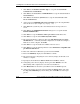
a. Press the S key to specify additional SCSI adapters.
b. When prompted, insert the ZCR driver diskette you created from the Startup
CD-ROM.
c. Press the Enter key to continue.
d. Select Adaptec I20 RAID Adapters for Windows 2000 & XP 32 bit, and
then press the Enter key.
e. Press the Enter key to continue.
4. Press the Enter key to proceed to the Welcome to Setup screen. Continue with
the standard Windows installation as described in Step 5 of the “Section 2.
Performing the Windows 2000 Installation” section earlier in this chapter.
Section 8. Troubleshooting
This section will help you resolve some of the most common installation problems
associated with Windows 2000.
Tip #1. Windows 2000 Installation Halts about Three Minutes after
Starting to Boot from CD-ROM
When installing Windows 2000 on any X86 system with more than one hard drive it
is possible to experience the following error:
Setup has encountered an error and cannot continue. Contact
technical support for assistance. The following status codes
will assist them in diagnosing the problem. (0x4, 0x1, 0x0,
0x0)
The cause of this problem is that the NTLOADER is encountering a duplicate hard
drive signature. This signature is calculated by the NTLOADER code after reading a
specific sector offset from the hard drive. The following list provides some of the
things that can cause a hard drive to have duplicate signatures:
1. Low-level formatting the drives. We reproduced this on several systems at HP.
2. When you have a set of drives previously used with a DAC and move them to a
SCSI adapter.
2-14 HP ProLiant ML150 Server NOS Installation and Software Guide
HP CONFIDENTIAL
Writer: Pauline Tsai File Name: c-ch2 Installing Microsoft Windows 2000 Server and Small Business Server 2000.doc
Codename: Stone Soup Part Number: 343330-003 Last Saved On: 1/7/04 3:49 PM