
ProLiant ML150 Server NOS - (English) Installation and Software Guide

Before You Begin
continued
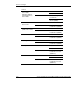
SCSI driver
LAN driver
HP drivers
ZCR driver
SCO OpenServer
5.0.7
HP utilities HP ML150 Server
Health Driver for
OpenServer
(MSHD-O)*
* Must be installed to support important server health functions.
NOTE: The HP Startup CD-ROM is not bootable.
The detailed instructions relative to each specific step (location of drivers,
workarounds) are provided in the respective NOS chapters (Chapters 2 to 12). The
installation information for the HP utilities is provided in Chapter 13. For the detailed
information on using the HP utilities, please refer to Appendix A of this guide.
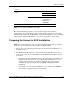
Preparing the Server for NOS Installation
NOTE: It is recommended that you do not install any third party adapter until you verify that
the server is functioning properly and you complete the NOS installation.
•
•
Prepare the server following the instructions in the HP ProLiant ML150 Server
Installation Sheet.
The HP ProLiant ML150 server comes with new hard disk drive(s) that do not
need specific setup. If you install additional and USED hard disk drives in your
new server:
— Note that most NOS installations remove all data from the hard disk they are
installed on. If you wish to use your additional hard disk drives to access
existing data in your new server, HP recommends that you install and
configure this (these) hard disk drive(s) AFTER completing the NOS
installation.
— If you wish to recycle used hard disk drives, use a utility such as FDISK to
erase all data and partitions from your hard drive.
HP ProLiant ML150 Server NOS Installation and Software Guide 1-3
HP CONFIDENTIAL
Writer: Pauline Tsai File Name: b-ch1 Before You Begin.doc
Codename: Stone Soup Part Number: 343330-003 Last Saved On: 1/7/04 3:45 PM