
ProLiant ML150 Server NOS - (English) Installation and Software Guide

Using the HP Utilities
Indicators
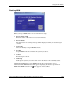
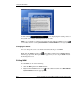
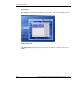
There are three indicators and a LED on the upper right corner of the MSM window.
The indicators display the status of WatchDog, OEC, and Monitor with the on/off
indication below. The LED displays the status of the system monitoring.
Starting Auto Refresh of Sensor Readings
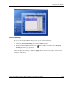
Click off below Monitor. The LED turns from red to green indicating that auto
refresh of the sensor readings has been enabled.
To turn off the auto refresh function, click on below Monitor.
NOTE: If you press the Refresh button on the System Monitoring panel once without turning
on the Monitor indicator, the sensor readings will be refreshed only once.
Starting Auto Reset of Threshold Values
Click off below OEC. A message appears to confirm that OEC is starting. When the
OEC indicator is turned on, the Monitor indicator will be turned on as well.
NOTE: You need to first set the OEC duration in the Auto tab of the General Settings panel
before turning on the auto reset of threshold values. Refer to the later section for details.
To turn off the auto reset function, click on below OEC. The Monitor indicator will
be turned off as well.
Starting Watch Dog
If the sever hangs, Watch Dog allows the server to reboot automatically as the
hardware counter timer reaches the timeout value. To enable Watch Dog, click off
below WatchDog.
NOTE: You can set the Watch Dog timeout value in the General tab of the General Settings
panel. Refer to the later section for details.
HP ProLiant ML150 Server NOS Installation and Software Guide A-5
HP CONFIDENTIAL
Writer: Pauline Tsai File Name: o-appa Using the HP Utilities.doc
Codename: Stone Soup Part Number: 343330-003 Last Saved On: 1/7/04 4:18 PM