
ProLiant ML150 Server NOS - (English) Installation and Software Guide

Using the HP Utilities
Starting MSM
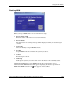
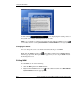
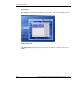
When you log in MSM, there are several items for setup:
•
•
•
•
•
•
Server Name or IP
Enter the name or IP of the server to be monitored.
Server Status
The login status or warning message will be displayed when you use this login
console.
User login
Select an identity to log in MSM Console.
Log On
Log in MSM Console to monitor the system you select.
Cancel
Exit the login console.
Wake Up
Wake up the system you select when it is in the Power-off or Standby status.
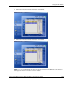
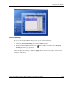
Click the Log On button to start MSM Console after selecting the correct
information. The MSM window will appear displaying the license agreement of
MSM. The MSM Console icon
also appears on the taskbar.
HP ProLiant ML150 Server NOS Installation and Software Guide A-3
HP CONFIDENTIAL
Writer: Pauline Tsai File Name: o-appa Using the HP Utilities.doc
Codename: Stone Soup Part Number: 343330-003 Last Saved On: 1/7/04 4:18 PM