
ProLiant ML150 Server NOS - (English) Installation and Software Guide

Using the HP Utilities
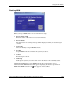
• Scope
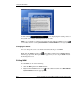
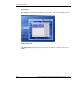
In MSM Console, you can view the sensor readings, and set the threshold and
alert settings in the Scope panel.
•
•
•
•
•
•
•
Sensor Threshold Setting
In MSM Console, you can set the sensor threshold setting to lower or upper in
the Scope panel.
Alert and Error Action
MSM Server Agent supports the alert and error action on the host server, such as
email, power-off and reboot, when the sensor reading is abnormal. You can
configure the settings in the Scope panel.
Alert History Log
All alert (email, reboot and power-off) history can be logged in MSM Server
Agent.
Sensor Reading Log
Sensor readings can be logged in the specified file in MSM Console, and the log
frequency equals to the refresh rate.
Operating Environment Computation (OEC)
MSM Console monitors and calculates the host sensor readings at the specified
time. You can configure MSM to automatically adjust the corresponding
threshold. For the detailed instructions, refer to the Auto Tab section of
“Configuring MSM” on page 12.
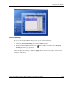
Floating Mini Window
In MSM Console, the mini window will automatically scroll the sensor readings.
Right-clicking the left of the mini window allows you to access the MSM menu.
To move the mini window, click and hold the left of the mini window.
MSM Console Icon
Right-click the MSM Console icon
to access the MSM menu. When the
window is minimized, click MSM Console icon
to restore the MSM window.
• Auto Fan Control
The Auto Fan Control function allows the system to automatically adjust the fan
speed to high, medium or low according to the system’s temperature. Enabling
this function can reduce noises and power consumption when the system runs in
full speed.
A-2 HP ProLiant ML150 Server NOS Installation and Software Guide
HP CONFIDENTIAL
Writer: Pauline Tsai File Name: o-appa Using the HP Utilities.doc
Codename: Stone Soup Part Number: 343330-003 Last Saved On: 1/7/04 4:18 PM