
HP ProLiant ML100 Series Server User Guide For HP ProLiant ML110 G6 and HP ProLiant ML150 G6 Servers

Hardware options installation 14
5.
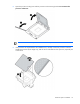
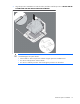
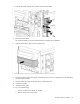
Open the processor locking lever and the processor socket retaining bracket. Do not remove the
processor socket cover.
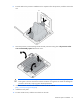
IMPORTANT: Be sure the processor remains inside the processor installation tool.
6. If the processor has separated from the installation tool, carefully re-insert the processor in the tool.
Handle the processor by the edges only, and do not touch the bottom of the processor, especially the
contact area.