
HP ProLiant ML 150 G6 Processor Installation Card
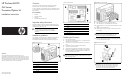

14. Properly align the heatsink mounting screws to the system
board mounting holes so that the air flow indicator arrow on
the top of the heatsink should point toward the rear of the
chassis (1) and tighten with a screwdriver (2).
15. Install heatsink(Figure 5)
Figure 5 Installing the heatsink assembly
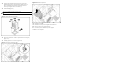
16. Connect the system fan 1 cable to system board connector (J54)
(Figure 6-1)
17. Installing system fan 1 to chassis. (Figure 6-2)
Figure 6-1 Connect the system fan cable
Figure 6-2 Install the system fan
18. Reinstall the air baffle.
19. Reinstall the access panel and tighten the thumbscrews.
20. Return the server to the upright position.
21. Connect the power cables to the power supplies.
Installation is now complete.
Do not over-tighten heatsink mounting screws.