
ProLiant ML150 Generation 2 Server Maintenance and Service Guide

Removal and Replacement Procedures
HP ProLiant ML150 Generation 2 Server Maintenance and Service Guide 2-49
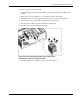
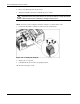
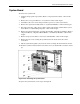
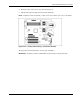
4. Press the battery release lever away from the battery (1).
5. Lift the battery up from that side and out of its holder (2).
NOTE: If expansion boards are installed, you may need to remove them to gain access to the battery.
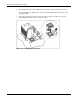
Figure 2-47: Locating and removing a system board battery
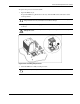
To replace the system board battery, reverse steps 2 through 5.
IMPORTANT: The battery should be installed with the positive polarity (+ side) positioned up.