
ProLiant ML150 Generation 2 Server Maintenance and Service Guide

Removal and Replacement Procedures
2-44 HP ProLiant ML150 Generation 2 Server Maintenance and Service Guide
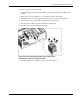
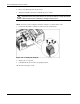
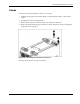
8. Open the Zero Insertion Force (ZIF) lever to allow the removal of the processor (1).
To open the ZIF lever, pull the lever out away from the ZIF socket and rotate it to the
vertical position.
9. Grasp the processor by its edges, lift it out of the socket (2), and place it on a static-
dissipating work surface or into an anti-static bag.
Figure 2-43: Removing the processor