
ProLiant ML150 Generation 2 Server Maintenance and Service Guide


Removal and Replacement Procedures
HP ProLiant ML150 Generation 2 Server Maintenance and Service Guide 2-31
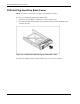
SATA Hot-Plug-Hard Drive
NOTE: The server does not need to be powered off to complete this operation.
To remove the SATA hot-plug hard drive:
1. Open the bezel door. Refer to “Bezel Door” earlier in this chapter.
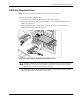
2. Push in the locking latch of the desired hard drive carrier (1) and then pull the ejector
handle towards you (2).
3. Gently pull the hard drive carrier straight out to disengage the connection from the
backplane and then out of the drive bay (3).
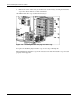
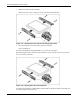
Figure 2-31: Removing the SATA hot-plug hard drive
CAUTION: You must remove the drive slowly about an inch to disconnect from the
backplane, and wait 30 seconds for the drive to stop spinning to ensure the drive heads are
parked prior to removal. Be sure you follow these instructions carefully to prevent handling
damage, such as head slaps or head actuator unlocking.
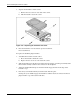
4. Use your hand to support the bottom of the hard drive carrier while you slowly pull the
carrier straight out. Do not allow the carrier to fall.