
ProLiant ML150 Generation 2 Server Maintenance and Service Guide


Removal and Replacement Procedures
2-28 HP ProLiant ML150 Generation 2 Server Maintenance and Service Guide
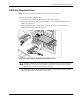
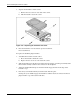
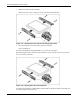
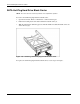
7. Remove the rails from the hard drive.
Remove the two screws securing each rail on the side of the hard drive.
Figure 2-27: Removing the rails from the non-hot-plug hard drive
8. Place the hard drive in an electrostatic protected container.
Do not stack drives.
To replace the SCSI non-hot-plug hard drive, reverse steps 2 through 8.
When attaching the rails to the sides of the hard drive, be sure that the screws are secured in
the correct holes on the rails.
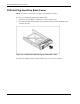
Figure 2-28: Attaching the rails to the hard drive
Verify that the hard drive is flush with the other hard drives. If the hard drive is not flush, it is
not seated properly in the drive bay.