
ProLiant ML150 Generation 2 Server Maintenance and Service Guide


Removal and Replacement Procedures
2-22 HP ProLiant ML150 Generation 2 Server Maintenance and Service Guide
SCSI Hot-Plug Hard Drive Blank Carrier
NOTE: The server does not need to be powered off to complete this operation.
To remove the SCSI hot-plug hard drive blank carrier:
1. Open the bezel door. Refer to “Bezel Door” earlier in this chapter.
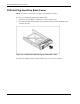
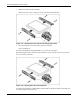
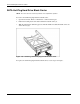
2. Locate the desired hard drive blank carrier. Hold the handle and slide the blank carrier
out of the drive bay.
Figure 2-21: Removing the SCSI hot-plug hard drive blank carrier
To replace the SCSI hot-plug hard drive blank carrier, reverse steps 1 through 2.