
HP ProLiant ML150 Lights-Out 100 Remote Management Card Installation Instructions

Installing the Card
1. Back up the server data.
2. Shut down the operating system in an orderly manner, as
directed in the operating system instructions.
3. If the server is on, press the power button to power down the
server.
4. Disconnect all power cords.
5. Remove the access panel.
Refer to the installation sheet included with the server for the
removal procedure.
6. Carefully lay the server on its unexposed side to gain access to
the system board.
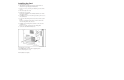
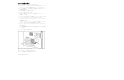
7. Locate the remote management card connector on the system
board.
Refer to “Card Connector Location” for the location of the
remote management card connector.
8. Install the remote management card in the connector on the
system board.
Be sure to seat the card properly on the fixing pillar.
9. Secure the card with the hexnut screw.
10. Replace the access panel.
11. Carefully lift the server back to its upright position.
12. Reconnect all power cords.
The installation is complete.