
HP ProLiant ML150 G2 Lights-Out 100 Remote Management Card Installation Guide

Installation 7
2.
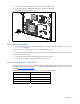
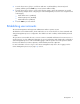
Locate the remote management card connector on the system board.
3. Remove the remote management card from its protective packaging.
4. Install the remote management card.
Post-installation procedures
1. Be sure all components are installed according to the "Pre-installation procedures ("Preinstallation
procedures" on page 6)."
2. Be sure you have not left any loose tools or parts inside the server.
3. Reinstall any expansion boards, peripherals, board covers, and system cables previously removed.
4. Reinstall the system covers.
5. Connect all external cables and the AC power cord to the system.
6. Press the power button on the front panel to turn on the server.
Switch settings and BIOS requirements
To ensure proper operation of the ProLiant ML150 G2 Lights-Out 100 remote management processor, the
server BIOS must be version 0.28 or later. You can download the latest BIOS for your server on the HP
website (http://www.hp.com/support
).
The remote management card switches must be set to factory default settings.
Switch Setting
SW1 Off
SW2 On
SW3 On
SW4 Off