
ProLiant ML115 Installation Sheet
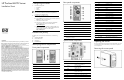
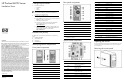
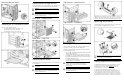
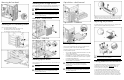

Removing the front bezel
Installing the PCI accessory board
The server supports four PCI bus slots.
• Two 32-bit/33-MHz 3.3V PCI bus slots (J6 to J7)
• One PCI-Express x8 line with x8 slot (J8)
• One PCI-Express x16 line with x16 slot (J9)
Installing mass storage devices
The four lower drive bays on the
front panel can accommodate up to
four hard drives. The server sup
ports both SATA and SAS drives.
WARNING!
Power down the server before installing hard
drives.
CAUTION: Drives can be damaged by static electricity.
Before handling drives, touch an unpainted metal surface
to discharge static electricity.
Hard drive – shield removal
Hard drive – SATA/SAS
Installing optical drives
The two upper drive bays on the front panel can accommodate up to
two optical drives.
WARNING!
Power down the server before installing
optical drives.
CAUTION: Drives can be damaged by static electricity.
Before handling drives, touch an unpainted metal surface
to discharge static electricity.
Optical drive – shield removal
Optical drive – installation
Installing memory
The server has four DIMM slots that support up to 8 GB maximum
system memory (2 GB in each of the four DIMM slots).
The following guidelines must be followed when memory mo
dules
are being added or replaced:
• Use only DDR II 667/800 unbuffered ECC DIMMs in 512 M
B,
1 GB or 2 GB configuration.
• Supported DIMM configurations are single DIMM, one pai
r
(two DIMMs), or two pairs (4 DIMMs). Channel A corresponds
to the DIMM1 and DIMM2 slots, while channel B corresp
onds
to the DIMM3 and DIMM4 slots.
• For optimal 2 DIMMs configuration, populate slot 1 and slot
3.
Identical DIMMs are recommended.
CAUTION: DIMMs can be damaged by improper
handling. Always use an anti-static wrist strap and
grounding mat, and discharge static electricity before
touching DIMMs.
CAUTION: If there are ECC errors in the DIMM(s) during
the system start-up and the scr
een is blank, the system will
have 8 short beep sounds.
DIMM slots are structured to ensure proper installation. If you insert a
DIMM but it does not fit easily into
the slot, you may have inserted it
incorrectly. Reverse the orientation of the DIMM and insert it ag
ain.
Replacing the processor
The AMD AM2 socket in HP ProL
iant ML115 server supports AMD
Opteron 12XX series/(AMD Athlon 64) processors.
CAUTION: There is the arrow mark on the side of cooler
that shows you the correct installation.
Getting additional documentation
For additional documentation, refer to HP ProLiant ML115 Server
Support CD. You can also access additional information and
documentation from the HP website,
www.hp.com
either by
connecting directly or through the Support CD.
© Copyright 2006 Hewlett-Packard Development Company, L.P.
The information contained herein is subject to chan
ge without notice. The
only warranties for HP products and services are set fo
rth in the express
warranty statements accompanying su
ch products and services. Nothing
herein should be construed as constituting an additional warranty. H
P shall
not be liable for technical or editorial errors or omissions co
ntained herein.