
ProLiant ML110 Generation 2 Server Maintenance and Service Guide

Index
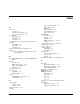
Advanced menu settings 3-5
cable routing 2-10
A
ESD 2-1
AC power
improper airflow 2-4
connector 4-3
power fluctuations 2-5
disconnecting, warning 2-4
proper cooling 2-5
power-down procedures 2-4
CMOS RAM
access panel
clear switch 4-7
part number 1-2
clearing 3-12
reinstalling 2-6
definition 3-2
removing 2-5
POST error message 3-16, 3-17
acoustic emissions, environmental specifications 5-5
resetting 3-12
air baffle
component-level repairs, warnings 2-1
part number 1-2
console redirection 3-5
reinstalling 2-9
cooling, caution 2-5
removing 2-9
core logic chipset
altitude, environmental specifications 5-5
north bridge 5-2
ATX
south bridge 5-2
Advanced Technology eXtended See system
board, platform
CSR program
customer replaceable list 1-1
overview 1-1
B
website 1-1
Customer Self Repair See CSR program
Basic Input/Output System See PhoenixBIOS Setup
Utility
D
battery
location 2-34
diagnostics
POST error message 3-16
additional information 3-19
replacement warnings 2-35
Diagnostic for Windows 3-19
replacing 2-35
PhoenixBIOS software 3-1
boot block switch 4-7
Diagnostics for Windows 3-19
boot sequence
DIMM slots 2-30
configuring 3-6
DIMM specifications
default settings 3-6
dimensions 5-5
buttons
packaging 5-5
CD-ROM drive eject button 4-2
size 5-5
power button 4-2
speed 5-5
type 5-5
C
dip switch See system configuration switch
diskette drive
cable routing
POST error messages 3-16
caution 2-10
system board connector 4-5
diagrams 2-10
Cable-Select mode 2-15
cautions
HP ProLiant ML110 Generation 2 Server Maintenance and Service Guide Index-1