
ProLiant ML110 Generation 2 Server Maintenance and Service Guide

Connectors, Switches, and LEDs
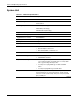
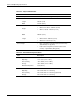
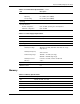
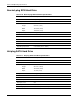
Table 4-7: LAN LED Indicators Status
Item Component Status Description
Steady green An active network link exists.
Flashing green An ongoing network data activity exists.
1 LAN activity/link
status LED indicator
Off The server is off-line
Steady green The LAN connection is using a GbE link.
Steady amber The LAN connection is using a 100 Mbps link.
2 LAN network speed
LED indicator
Off The LAN connection is using a 10 Mbps link.
System Board LED Indicators
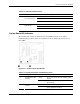
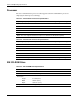
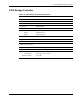
The system board contains two internal power status LED indicators for use during
troubleshooting operations. Figure 4-11 and Table 4-8 show and describe the function of
these LEDs.
Figure 4-11: System board LED indicators
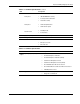
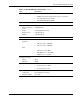
Table 4-8: System Board Power LED Indicators Status
Item Component Status Description
Green The server is in standby mode (auxiliary power
present).
1 Standby mode LED
indicator
Off The server is powered off (AC power
disconnected).
Green The system has adequate AC power. 2 Power-on LED
indicator
Off Either the power cord is not connected or the
power supply unit has failed.
HP ProLiant ML110 Generation 2 Server Maintenance and Service Guide 4-13