
ProLiant ML110 Generation 2 Server Maintenance and Service Guide

Connectors, Switches, and LEDs
Hard Drive LED Indicators for Hot-plug SATA Drives
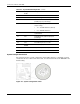
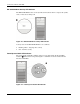
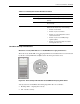
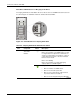
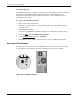
A hot-plug SATA device installed in the server has its own set of LED indicators located on
its carrier. Figure 4-9 and Table 4-6 show and describe these LEDs.
Figure 4-9: LED indicators on a hot-plug SATA drive
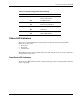
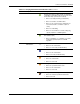
Table 4-6: Hot-plug SATA Drive LED Indicators Status
Item Component Status Description
Forced off (override drive activity output)
Drive is not a member of any RAID volumes; or drive
is configured but in a replacement or failed state for
at least one volume that it is a member of; or drive is
a spare drive that is inactive or has been activated
but has not been rebuilt.
Drive is not rebuilding
Drive is not a member of a volume undergoing
capacity expansion or RAID migration
1 Drive activity
status LED
indicator
Solid green
• Drive is a member of a RAID volume
• Drive is not an inactive spare drive
• Drive is not in a replacement or failed state for
any volumes that it is a member of
• Drive is not currently performing any I/O activity
continued
4-10 HP ProLiant ML110 Generation 2 Server Maintenance and Service Guide