
ProLiant ML110 Generation 2 Server Maintenance and Service Guide

Removal and Replacement Procedures
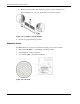
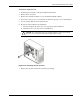
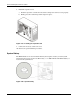
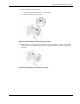
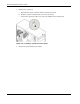
7. Install a new system fan:
a. Insert the tabs on the system fan frame to their chassis notch.
b. Slide the system fan downward to secure it to the chassis.
c. Connect the system fan cable to its connector (CN10) on the system board.
Figure 2-47: Installing a system fan on the chassis
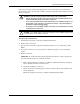
8. Observe the post-installation procedures.
2-40 HP ProLiant ML110 Generation 2 Server Maintenance and Service Guide