
ProLiant ML110 Generation 2 Server Maintenance and Service Guide

Removal and Replacement Procedures
System Fan
A new system fan can be installed to allow the server to operate properly in case the default
system fan becomes defective.
To replace the system fan:
1. Perform steps 1 through 3 of the pre-installation instructions.
2. Remove the access panel.
3. Remove the air baffle.
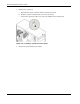
4. Remove the default system fan:
WARNING: Be sure to support the system fan with your hands when removing it from
the chassis. The fan could fall onto the system board or an accessory board causing
damage if not supported.
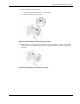
a. Disconnect the system fan cable from its connector (CN10) on the system board.
Perform step (b) and (c) simultaneously.
b. While supporting the system fan with one hand push a finger through the middle
ventilation hole on the rear panel.
c. Slide the system fan upward to disengage the frame tabs from the chassis.
d. Pull the system fan away from the chassis.
Figure 2-44: Removing the system fan from the chassis
2-38 HP ProLiant ML110 Generation 2 Server Maintenance and Service Guide