
ProLiant ML110 Generation 2 Server Maintenance and Service Guide

Removal and Replacement Procedures
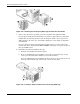
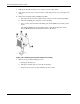
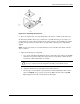
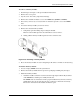
11. Replace the heatsink-cooling fan assembly:
a. Align the HSF mounting pins to the system board holes and press it down until you
hear a click.
b. Twist the mounting pins counter-clockwise to secure the HSF’s connection to the
system board.
c. Connect the processor fan cable to its connector on the system board (CN7).
CAUTION: Failure to connect the processor fan cable to its connector may cause the
server to shut down with no messages displayed and possibly damage the processor.
Figure 2-33: Installing the heatsink-cooling fan assembly
12. Observe the post-installation procedures.
HP ProLiant ML110 Generation 2 Server Maintenance and Service Guide 2-29