
ProLiant ML110 Generation 2 Server Maintenance and Service Guide

Removal and Replacement Procedures
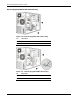
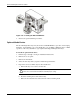
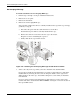
Figure 2-17: Preparing the drive bay for installation
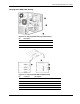
6. Prepare the new drive for installation.
Refer to the documentation that came with the drive for related installation procedures.
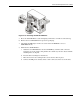
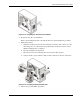
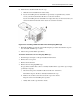
7. Install the new drive:
a. Guide the new drive into the selected common bay, with the cable connectors of the
drive facing the rear of the chassis, then push the drive all the way into the chassis
until the mounting holes are aligned.
b. Press the retaining lever downward.
c. Move the lever into its retaining hook to secure the new drive in place.
d. Connect the drive power and data cables to their connectors on the rear of the drive.
Figure 2-18: Installing an optional media drive
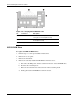
8. Observe the post-installation procedures.
HP ProLiant ML110 Generation 2 Server Maintenance and Service Guide 2-17