
ProLiant ML110 Generation 2 Server Maintenance and Service Guide

Removal and Replacement Procedures
Drive Bay Configuration
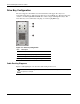
The server supports a maximum of seven internal drives. The upper drive bay is for
removable media devices, while the lower drive bay is for an HDD cage. The upper drive bay
contains a one-half height IDE CD-ROM drive and two empty full-height drive bays. The
lower drive bay can accommodate a hot-plug or a non-hot-plug HDD cage.
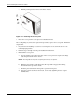
Figure 2-7: Drive bay configuration
Item Description
1 IDE CD-ROM drive
2 Full-height drive bays (empty)
3 HDD cage
Note: Figure 2-7 shows a non-hot-plug HDD cage.
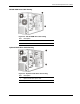
Cable Routing Diagrams
Figure 2-8 through Figure 2-12 show the cable routing for the server.
CAUTION: When routing cables, be sure that the cables are not in a position where they can
be pinched or crimped.
2-10 HP ProLiant ML110 Generation 2 Server Maintenance and Service Guide