
Supporting HP TeachNow, v 1.1 update



HP TeachNow Solution
Overview
The standard HP TeachNow solution is a mix of PSG/DSO, ISS, and Microsoft components that make up a combined
hardware/software product, designed to bring low-cost computer-based instruction to the classroom. HP TeachNow
provides an easy-to-use interface for a teacher to manage a classroom full of student desktop devices, and to prepare
electronic content before the class, and then deliver that content once the class is in session.
Solution hardware components
The standard hardware components include the following:
• HP ProLiant ML110 G6 Server (or equivalent) for the HP TeachNow Server
• HP ProCurve 1810G Gbit switch (or equivalent) to provide the classroom network backplane.
Note: Consider a higher-end model for customer use cases where advanced network features like IP Routing
or Access Control Lists are needed within the design of the solution itself.
• HP st5742 or st5747 streaming thin clients (student stations). These are flashless versions of the HP t5740
thin client hardware. These units have 2GB RAM to support the streamed OS.
Note: If the customer plans to create their own streaming image, the HP 16GB SATA II IDE Solid State Flash
Drive (P/N:AZ550AA) may be required.
• A typical HP business class PC (for the teacher)
Solution components
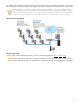
The system consists of three major components:
• HP TeachNow server – The central server which delivers both the student desktop operating system (via
virtual disk streaming) and the lesson content to the student devices, as well as providing a web-interface
console interface (GUI) for an administrator to provision the system, and the controls that the teacher’s
application will use to control the classroom.
• Teacher application – Software that the teacher runs on a desktop or laptop to control the classroom and
deliver content to the students. The teacher’s application can run offline, for example on the Teacher’s home
computer, to prepare content, or it can connect to the HP TeachNow server, to control the devices and the
learning in the classroom.
• Student desktops – Typically HP Thin Clients that the students can use to access Microsoft desktop operating
systems (Windows XP or Windows 7).
8