
Supporting HP TeachNow, v 1.1 update

38
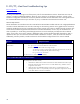
Check for NIC
issues
On the NIC, check that the IP address is valid and reserved for this server
o TeachNow is not supposed to run on the same machine as a DHCP server
o If the customer absolutely MUST use the same server for TeachNow and DHCP, you will need
to provide them with the special instructions that are in the HP Image Manager 4.x User
Guide, Appendix D. This information is not in any of the current HP TeachNow
documentation.
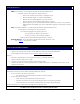
o If one NIC is present and showed as “connected”, open TCP/IP configuration for that NIC and check
that TCP/IP address is NOT configured to be set automatically: A DHCP server MUST have a static IP
address;, ensure that this static IP address is not in use elsewhere on the network:
o Disconnect the TeachNow server from the network, and from another machine try pinging that static IP
address
o There should be no response to the ping request, if the server is not on the network
o If there is a response, find the machine that is using this IP address and reassign it
o If there is a response, make sure the DHCP server has a reservation in it’s scope for this host
Once resolved, reconnect the TeachNow server to the network.
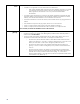
Check netmask &
gateway
Ensure that the netmask and gateway are correctly configured
o Compare the entries in the “netmask” and “default gateway” fields from those obtained by DHCP on
another machine on this subnet.
o The first “N” fields of the gateway should match the first “N” fields of the IP address, where “N” is
found from the number of bits in the subnet mask. For example, if the subnet mask is:
o 255:255:255:0, then the first three numbers in the IP address should match the first three
numbers in the gateway, so 192.168.7.1 would be a valid gateway for a 192.168.7.22 IP
address, but 192.168.8.1 would not be a valid gateway address for this host.
o 255:0:0:0, then the first number in the IP address should match the first number in the
gateway, so 10.0.0.1 would be a valid gateway for any machine whose IP address starts
with “10”.
o 255:255:254:0 (less common), the netmask is a binary bitmask so this specifies that the
gateway must have the first two numbers the same, the third number must be similar (here it
would be within one bit), and the last number can be anything. So, a 192.168.6.1
gateway would be valid for a 192.168.7.28 host, and vice-versa (because the third number
in the IP address is only different by “1”.