
Supporting HP TeachNow, v 1.1 update

C: TeachNow, technical detail
Back to Appendices
Back to document index.
How it works
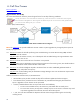
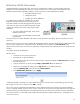
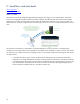
HP TeachNow uses the HP Image Manager (HPIM) technology as the “engine” for the student stations. The specific
functions are configured through the Teacher and Admin interfaces, but HPIM provides the virtual hard drive (VHD)
capability that is used by all of the student stations. When the student station PXE boots, the OS image streams to the
RAM of the client. When this image executes, the HPIM engine on the server “serves” a VHD that the client sees as its C
drive.
Server with virtual
Hard Drive (C:\)
The Flashless Client
thinks it’s a typical
PC w/ a local Hard
Drive
Users have the power of a PC with
the added security, manageability and
reliability you gain from maintaining the
OS on the server and streaming an
image to flashless thin clients.
The TeachNow console GUIs manage
the desktops, images, and overall system
status.
The experience at the station is comparable to a standard desktop PC. However, because it is controlled by HP
TeachNow, the OS image and the content available to the student can be changed in a matter of minutes. The Teacher
can distribute a new image to the class by changing an option in the Teacher interface and restarting the class stations.
For Administrators:
• TeachNow provides a simple, intuitive interface that the administrator uses to perform all of the setup,
configuration, OS image management and capture, startup/shutdown of the solution, and status monitoring.
• The interface hides the complex operations that are managed by the HP Image Manager components. As a
result, HP TeachNow administrators do not need to know how to administer HP Image Manager; they are
concerned with the available functions in the Admin interface only.
30