
Supporting HP TeachNow, v 1.1 update

28
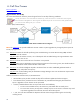
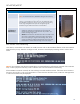
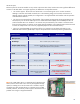
Interpreting the client DHCP boot display:
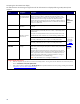
This table describes the meaning and significance of the information that is displayed during a PXE (network) boot
sequence.
Item: Description Response
MAC Address
If a MAC address is
listed, the NIC portion
of the system board is
OK.
If no MAC Address appears, the NIC does not have a physical address.
All NICs must have a factory configured NIC hardware address. Every
NIC in use world-wide must have a unique hardware address. Every NIC
manufacturer has controls a range of unique NIC addresses that they
allocate during the manufacturing process. If the BIOS is able to attempt a
boot, but no NIC address displays, then there is a hardware issue that will
require unit replacement.
GUID
General system board
information.
If no GUID information, the system board is at fault and should be
replaced.
Unit
hardware
event.
Client ID
If no Client ID information displays, there is no network connection. This
may be caused by a bad cable, the server is down, or (least likely) a bad
system board.
Verify the connectivity between the client, the switch, and the server; and
validate that the switch and server are on and indicating a healthy status.
MASK
If no MASK information there is no network connection. This may be
caused by a bad cable, the server is down, or a bad system board.
DHCP IP
Information received
from the server
If no DHCP IP information there is no network connection. This may be
caused by a bad cable, the server is down, or a bad system board.
PXE-M53 and
PXE-M0F
PXE boot status
messages
If the client does not receive the boot file name, PXE will timeout and the
client will try to boot using the next options in the boot order priority in the
BIOS settings.
Check the physical connectivity (client to switch, switch to server), ensure
that the switch is powered on and showing normal operational status on its
LEDs, verify that the switch is connected to the correct RJ45 on the server
(upper right). Use the Admin GUI to verify that TeachNow is running on
the server and that there is an available image.
Info: A list of the PXE boot error messages is available here
.
If you cannot
resolve the
issue, follow
the Single
/multiple unit
response
guidelines
described
below.
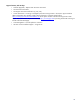
Single/multiple unit rsponse:
• If this is a single unit issue, but other units connect successfully, attach a “known good” network cable to the unit. If the issue persists,
declare a hardware event/unit replacement.
• If this condition exists for multiple clients, elevate to 2LS. 2LS will perform additional connectivity testing (including those described
in Appendix E: 2LS, client boot troubleshooting tips
).