
Supporting HP TeachNow, v 1.1 update
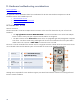
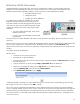
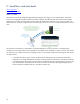

HP ProCurve 1810G 24 Port Switch
Suspected hardware issues elevate to 2LS. The switch is an HP ProCurve product, not a PSG product and switch
hardware issues are handled by ISS. However, since the switch function is critical to the initial installation of HP
TeachNow, PSG should provide basic guidance on how to perform an initial configuration including:
Verifying hardware function
Setting flow control
Configuring switch IP addressing
It is relatively easy to determine whether there is a switch
hardware issue by examining the switch front panel. The
front panel includes a Locator LED (triggered from the switch
web console to make it easy to identify a particular switch),
and LEDs to indicate power, faults, activity, duplex mode,
and speed.
• The power and fault LEDs apply to the overall
operation of the switch.
• Activity, mode, and speed LEDs are associated
with each port.
If the power LED is on and the fault LED is off, then the switch powered on successfully. The switch hardware is not the
likely issue.
The HP ProCurve 1810G switch uses a web-based management interface. The switch does not have a dedicated console
port. You use a web browser to configure the switch. The default 1810G IP address is 192.168.2.10 with a
255.255.255.0 subnet mask. You must use a system that is attached to the same subnet as the switch to access the web
interface.
To configure the switch for TeachNow:
Set flow control
• Connect a PC to any port on the switch.
• Record the PC’s original IP address
• Given that the PC must be on the same TCP/IP subnet, change its IP address to 192.168.2.11 and subnet
mask 255.255.255.0.
• Open a web browser on the PC and type http://192.168.2.10 in the address bar.
• When you are prompted for password, click log on (there is no default password).
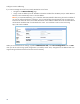
• Click the Switching tab on the left then select Flow Control.
• Select Enable Flow Control then click Apply.
A dialog box displays “Warning: Flow control Mode change will cause active links to momentarily go down and turn
active again. Do you wish to continue?” Click OK to continue.
Note: Flow control is important for HP TeachNow to ensure that the transmission to/from the client to the TeachNow
server is completely reliable. Since the client is using a virtual disk on the server for its storage and for the OS image, the
performance of the client itself depends on this high speed network link. The ProCurve 1810G switch was selected for
this solution because it is reasonably priced and provides enterprise-class reliability and functions – including functions
such as Flow Control.
25