
Supporting HP TeachNow, v 1.1 update

B: Hardware troubleshooting considerations
Back to Appendices
Back to document index.
This appendix contains TeachNow-related T/S considerations for the three main hardware components in the HP
TeachNow solution. The available topics are:
• HP ProLiant ML110 G6
• HP ProCurve 1810G 24 Port Switch
• HP st5742/st5747
HP ProLiant ML110 G6
Network connection
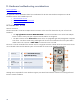
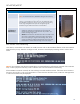
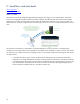
The HP ProLiant ML110 G6 has two RJ45 network connectors on the rear of the chassis but only one will work with
TeachNow.
• The top right RJ45 connector MUST BE USED to connect the TeachNow server to the local LAN (the
ProCurve 1810G switch). This port connects to the NIC that the OS recognizes.
• The RJ45 connector on the bottom left connects to the iLO (integrated Lights Out) management component
in the server. iLO allows remote testing and diagnosis of the core server hardware even if the system itself is
unable to boot. This connector is NOT USED to connect the server to its LAN.
The server will not be accessible if the customer uses the wrong RJ45 connector to attach the server to the switch. Clients
will not be able to boot and the Teacher system will not be able to connect to the TeachNow application.
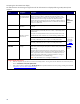
1 300W P/S
5
Network RJ-45
Note: Embedded NIC (top),
mgmt. NIC (bottom))
2 Sys. fan 6 VGA and COM ports
3
Tool-less
retention for I/O
cards
7 4 USB 2.0 ports
4 I/O slots 8 PS2x2 (KB, mouse)
Although ISS is responsible for server hardware support, PSG should ensure that the customer has correctly performed
the basic network installation.
24