
Supporting HP TeachNow, v 1.1 update
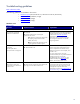
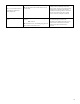

Usage: other Admin tasks
(setting up TeachNow for the
classroom, capturing and
importing images, adding
desktops, etc.) …
Yes: If the Admin has performed all of the tasks
described in “Setting Up TeachNow for Classroom
Use” and is still having difficulties, Elevate to 2LS.
No: Advise Admin to perform the tasks in the “Setting
Up TeachNow for Classroom Use” section in the
Admin User Guide.
These Admin tasks must be successfully completed
before the solution is available for use by a Teacher
or Student user.
1LS is not responsible for supporting the more
technical aspects of configuring the
TeachNow solution. The tasks include:
configuring the TeachNow serverlist.txt file
that is used by the Teacher interface, adding
desktops and images to the TeachNow server,
performing a “first boot” on the client OS
image master (with Read Only disabled),
activating the image license, and performing
any desired customizations. The image should
be tested before setting the image to Read-
Only and making it available for streaming to
multiple desktop clients.
Teacher interface (usage)
Return to top
1LS should be familiar with the concepts and procedures that are described in the HP TeachNow User Guide. If
you did not receive this guide when you obtained this white paper, you can obtain it at:
http://www.hp.com/go/teachnow
. The guide explains the Teacher-related concepts (classes, lessons,
calendar) and provides step-by-step instructions on how to perform the common instructional tasks using the
Teacher interface in TeachNow.
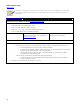
Question Responses/actions Explanation
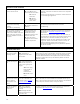
Does the issue seem related to one of the Appendix D: Known Issues?
The known Teacher interface issues include:
o Teacher interface cannot find a classroom.
o Some clients states turn orange (problem state) although the client is working fine.
o Teacher can view images that are not published.
o Time is incorrect on the published image.
Known issue?
Yes: Provide customer with the
guidance/workaround for the issue as described in
Appendix D: Known Issues
.
No: Continue.
The known issues listed in this document are
based on June 2010 information.
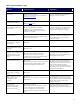
Installation
Is the issue related to installing
the Teacher interface?
Yes: Continue.
No: Go to Use
.
Do you have the Teacher
installation application and the
TeachNow configuration file?
Yes: Continue.
No: The Admin must provide the teacher with the
installer package and the configuration file. The
teacher should obtain the installer/config from the
Admin.
The Teacher installer (TeachNowTeacher.exe)
is included with the HP TeachNow installer.
The TeachNow.tncfg configuration file is
generated when the Admin installs TeachNow
on the server and selects the save/export
configuration option. The configuration file
provides information that the Teacher installer
needs to configure the interface.
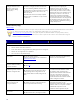
Does your system meet the
minimum requirements for
running the interface?
Yes: Continue.
No: Teacher must obtain a system that meets the
minimum requirements before continuing.
The interface does not require a high
performance PC but there are OS
requirements: Windows XP/Vista/7, Microsoft
Windows .NET 3.5 service pack 1 installed.
Adobe Reader required to view the
TeachNow Teacher application help file.
Did the installation complete
without error?
Yes: Continue.
No: Reboot the PC and try rerunning the installer.
18